


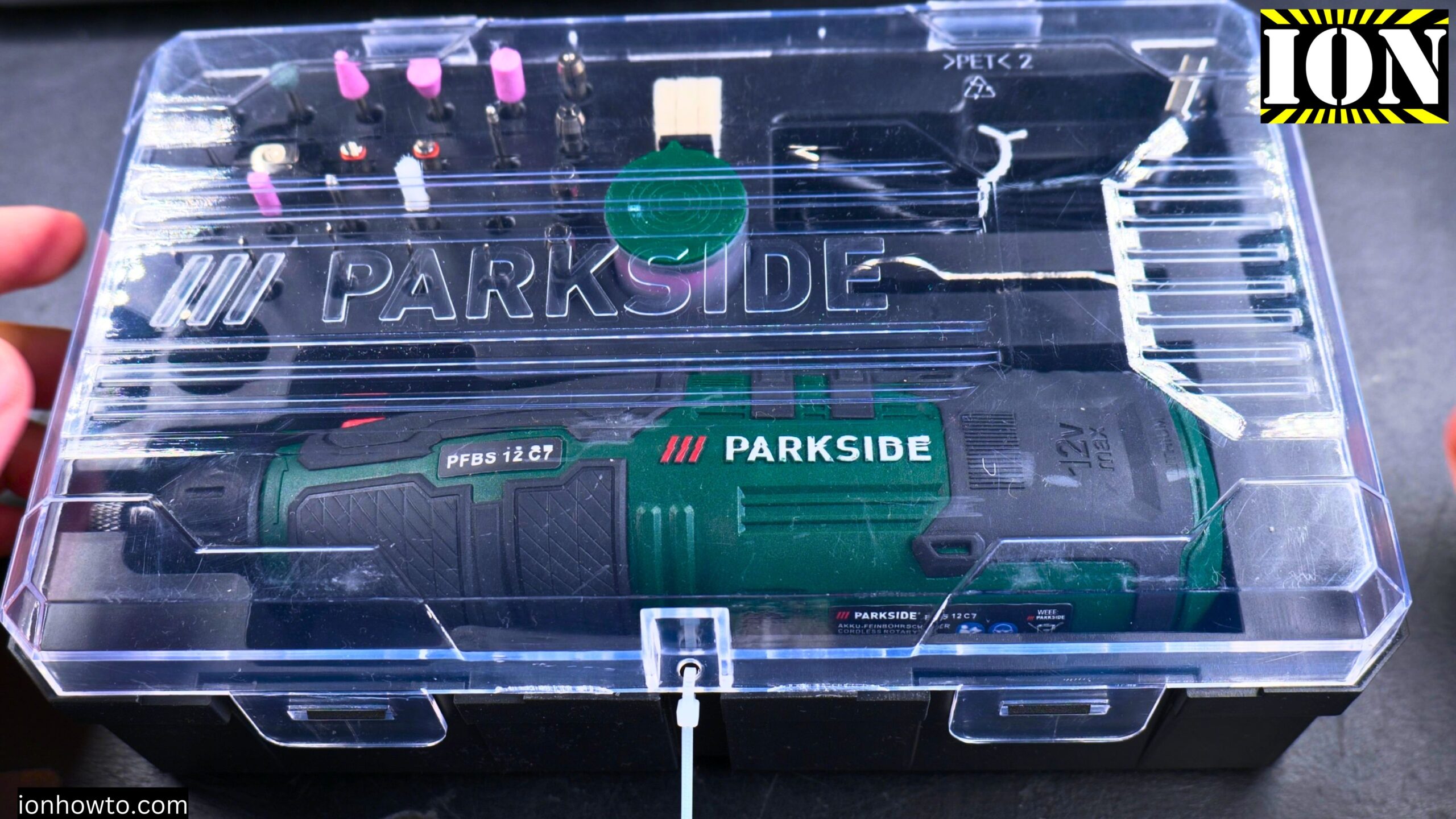
Parkside Rotary Tool PFBS 12C7 Unboxing and Test.
Learn what comes in the box and how well this affordable cordless rotary tool performs for drilling, grinding, polishing, and engraving.
I picked up this Parkside rotary tool from Lidl. It is a 12V cordless model that charges over USB-C. No power adapter is included, just a basic USB-C cable. The whole thing cost less than €20, which makes it a very budget-friendly option compared to name brand rotary tools.
This guide covers what is in the box, how the tool works, and what to watch out for based on my first tests.
What Is the Parkside PFBS 12C7?
This is a cordless rotary tool. Think of it like a Dremel but cheaper and from Parkside, which is Lidl’s own tool brand. It runs on a built-in 12V lithium-ion battery (1.3 Ah or 15.6 Watt-hours). You cannot remove the battery without opening the tool with a screwdriver.

Key specifications from the box:
· Rotation speed: 5,000 to 25,000 per minute
· Maximum bit size: 3.2 mm
· Maximum disc size: 25 mm
· Weight: about 380 grams
· Dimensions: 20.5 x 5.5 x 4.9 cm
· Charging: USB-C (charger not included)
What Is in the Box
The tool comes in a nice storage box. Everything has its own spot inside.
Included items:
· The rotary tool itself
· 44 attachments (grinding stones, cutting discs, brushes, felt polishers, drill bits)
· 5 collets (chucks) for different bit sizes (one pre-assembled)
· 1 replacement tool (the small wrench for changing bits)
· 1 USB-C charging cable
· Instruction manual
Missing from the box:
· USB power adapter (you need to supply your own)
· Charger block
First Impressions of the Tool
The tool feels comfortable in your hand. It has a soft-touch handle that is non-slip. The shape is compact and fits well for precision work.
There is a spindle lock button. This lets you lock the shaft so you can tighten or loosen the collet nut with the included wrench.
The speed control uses touch-sensitive buttons. You long press the power button to turn it on. Then you can adjust the speed up or down. The speed level shows on a small display.
About the USB-C Charging
The charging cable is very basic. It only has two wires inside. There is no communication chip telling the charger what voltage to provide. The cable likely uses a resistor configuration to request 12V from compatible USB-C chargers.
Not all USB-C chargers will work. The tool needs a charger that can supply 12V over USB-C. A standard 5V phone charger will probably not charge it properly.
The instruction manual says the charger is not included. You need to buy a compatible one separately or already own one.
Testing the Tool
When I first tried to turn it on, nothing happened. The battery was completely drained. I had to charge it first.
How to turn it on:
· Long press the power button (a short press does nothing)
· Use the up and down buttons to adjust speed from 1 to 6 (6 is fastest)
· Press the power button again to stop
Battery level check:
· Press the power button briefly while the tool is off
· The display shows the remaining battery level
You can also use the tool while it is charging. This is convenient if you need to finish a job and the battery is low.
The Cutting Discs – A Warning
The included cutting discs are very brittle. While trying to install one, I pressed on it slightly from the side and it broke immediately.
When you use these discs at high speed, they can shatter. Small pieces will fly out at high speed. Always wear safety glasses when using this or any rotary tool.
If you buy this tool, plan to buy extra cutting discs. The ones in the box break easily.
Trying Different Attachments
I tested a few of the included attachments.
Grinding stone: Worked well. The tool has plenty of power for light grinding on small objects. The speed control is useful here. Lower speeds for plastic or soft materials, higher speeds for metal.
Drill bit: Inserting the bit straight is important. If the bit goes in at an angle, it will vibrate badly. Take your time to get it centered.
Felt polisher: This works with polishing compound (or even toothpaste) to make small objects shiny. Good for jewelry or metal parts.
Collet system: The different collets let you use various bit sizes. The maximum size is 3.2 mm, so this is for small precision work only. Not for regular drilling into walls or wood.
What This Tool Is Good For
Based on the specifications and my test, this tool is designed for precision work.
Good for:
· Polishing small metal or plastic objects
· Engraving on soft materials
· Grinding small parts
· Drilling tiny holes in circuit boards (PCBs)
· Cutting thin materials with the discs (carefully)
Not good for:
· Heavy grinding or cutting
· Large drill bits (max 3.2 mm only)
· Extended heavy use (battery is small at 1.3 Ah)
How to Insert a Bit Correctly
I learned this the hard way. If the bit is not straight, the tool vibrates a lot and the bit may not spin true.
The correct way:
· Press the spindle lock button to lock the shaft
· Loosen the collet nut with the wrench
· Insert the bit straight and vertical
· Tighten the nut while keeping the bit straight
· Release the spindle lock
Take your time with this step. A straight bit makes the tool much easier to control.
Pros and Cons
Pros:
· Very affordable price (under €20)
· Cordless and convenient
· USB-C charging (no proprietary charger)
· Comfortable grip
· Good speed range
· Lots of attachments included
Cons:
· No charger included in the box
· USB-C charging is picky about which charger works
· Battery is not removable without opening the tool
· Cutting discs are brittle and break easily
· Bit must be inserted perfectly straight or it vibrates
Final Thoughts
For the price, this is a solid little tool. It is not as refined as a Dremel, but it costs much less. The cordless design is a big plus. You can use it anywhere without finding a wall outlet.
The brittle cutting discs are the biggest weakness. Buy extras if you plan to cut anything. And always wear eye protection.
If you do small hobby work like polishing, light engraving, or drilling tiny holes, this tool will serve you well. Just be aware of its limits. It is for precision, not heavy work.
Leave a Reply Cancel reply