
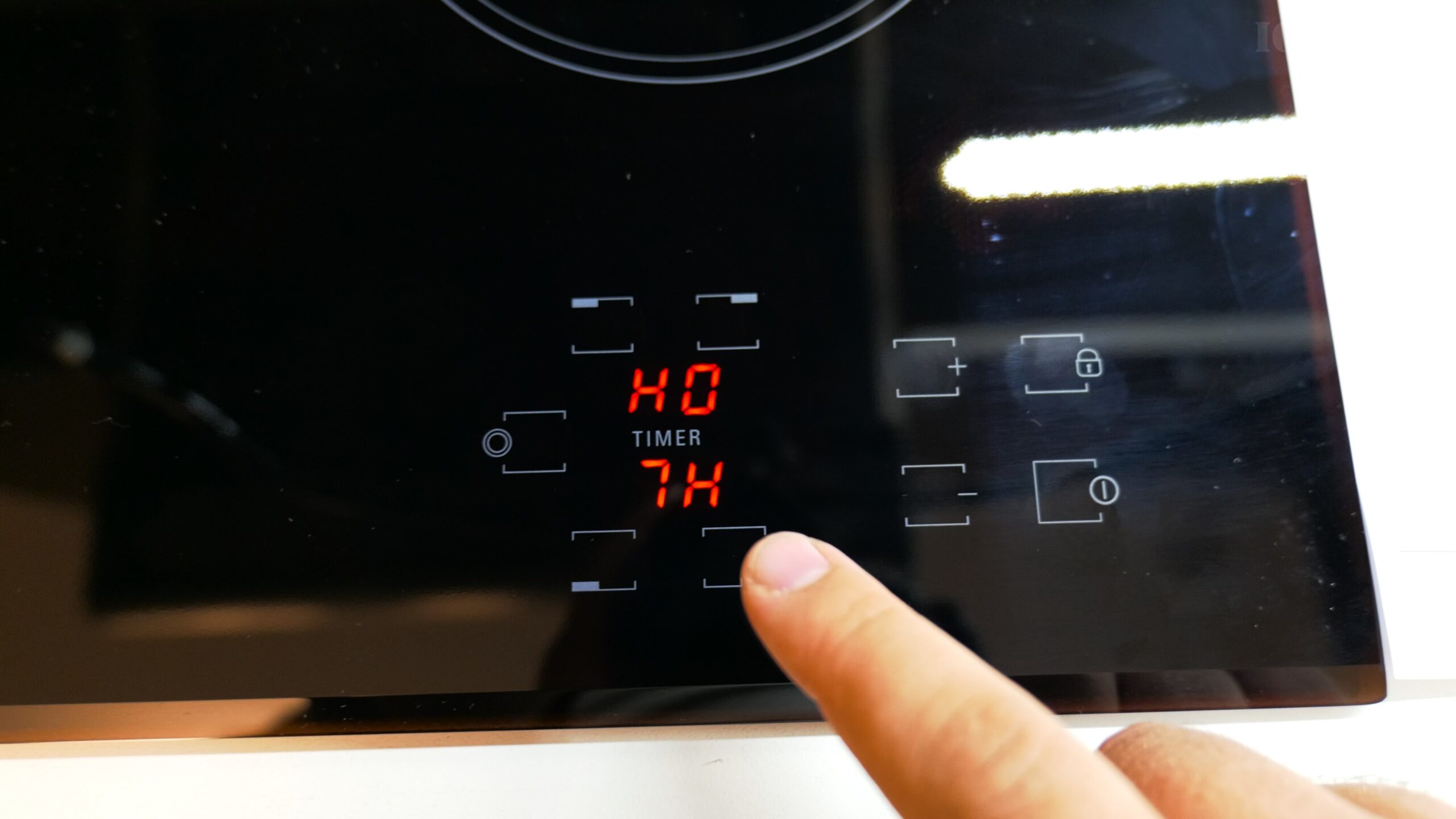
Your New Ariston Hotpoint Hob A First-Time User’s Guide.
Just installed a new Ariston Hotpoint HR 632 B electric hob? Congrats! That sleek, black glass top with five cooking zones looks fantastic in any kitchen. If you’re switching from an older stove with knobs, the touch controls might feel a bit different at first. Don’t worry, I’ll show you how to get started, from your very first boil to using the handy timer.
First Things First: Turning On Your Hob and Basic Safety
Before you start cooking, you need to wake the hob up and understand its safety features.
Powering On & The Safety Lock:
- To turn the hob on, find the main power button (it usually looks like a circle with a line through the top). Give it a light tap.
- You’ll hear a beep and likely see a lock symbol. This is the child safety lock. It prevents accidental presses.
- To unlock it, press and hold the lock button for about 2-3 seconds until the symbol disappears.
Important Safety Notes:
- The “H” Symbol: After you use a cooking zone, an “H” will appear to warn you that the glass is still Hot. This stays on until the zone cools down.
- Fingerprints: The glossy surface shows fingerprints easily. Always wait for it to cool completely before cleaning it with a recommended glass cooktop cleaner.
How to Use the Cooking Zones and Adjust Power
You have five heating areas: four standard zones and one dual-circuit zone on the top left for extra power.
Starting to Cook on a Zone:
- Press the power button for the specific cooking zone you want to use. It will start blinking.
- While it’s blinking, use the + and – buttons to set your power level from 1 (low) to 9 (high) or other functions.
- Once set, the zone will stop blinking, glow red, and start heating. You’ll hear a soft click from the thermostat as it turns on.
Using the Special Fifth Zone (Dual Circuit):
The top left zone has two rings. Here’s how to use it:
- First, select the main top left zone by pressing its power button.
- Use the + button to increase the power. After setting the inner ring, press the + button again. This will activate the outer ring, giving you a larger, more powerful cooking area for big pots or fast boiling.
Learn How to Use the Hob’s Timer Function
One of the best features of a touch-control hob is the built-in timer. You can use it as a reminder or to automatically turn off a cooking zone.
Setting a Countdown Timer:
- Make sure the hob is on and unlocked.
- Press the timer button. You’ll see a display light up.
- Use the + and – buttons to set the amount of time you want (e.g., 10 minutes).
- Press the timer button again to confirm. The timer will start counting down, and an alarm will sound when time is up.
Setting a Timer for a Cooking Zone:
This automatically switches a zone off after cooking.
- First, select your cooking zone and set its power level as normal.
- Then, press the timer button.
- Set the desired cooking time with the + and – buttons.
- Press the timer button again to start it. That zone will now turn off automatically when the time elapses.
Quick Troubleshooting and Reset Tips
- Nothing happens when I touch a button? Check for the lock symbol. You need to long-press the lock button to deactivate the safety lock.
- The zone turned off before I finished? If you select a zone but don’t set a power level within a few seconds, it will cancel the selection. Just tap the zone button again and quickly adjust the power.
- I need to reset everything: You can perform a full reset by pressing and holding the main power button for about 5 seconds. This is handy if the controls get confused.
Making the Most of Your New Hob
It’s normal to need a few days to get used to the touch controls if you’re coming from knobs or buttons. The light, quick tap can take a little practice. The key is to be deliberate with your presses.
Remember, your manual has model-specific diagrams for installation, cleaning, and warranty information (which can vary by country). If you ever get stuck, that’s the best place to check for detailed symbols and settings.
Now you’re ready to go! Enjoy your new Ariston Hotpoint hob and the precise control it gives you over your cooking.


Leave a Reply